Mastering Your Link on Bio Instagram Strategy for 2026
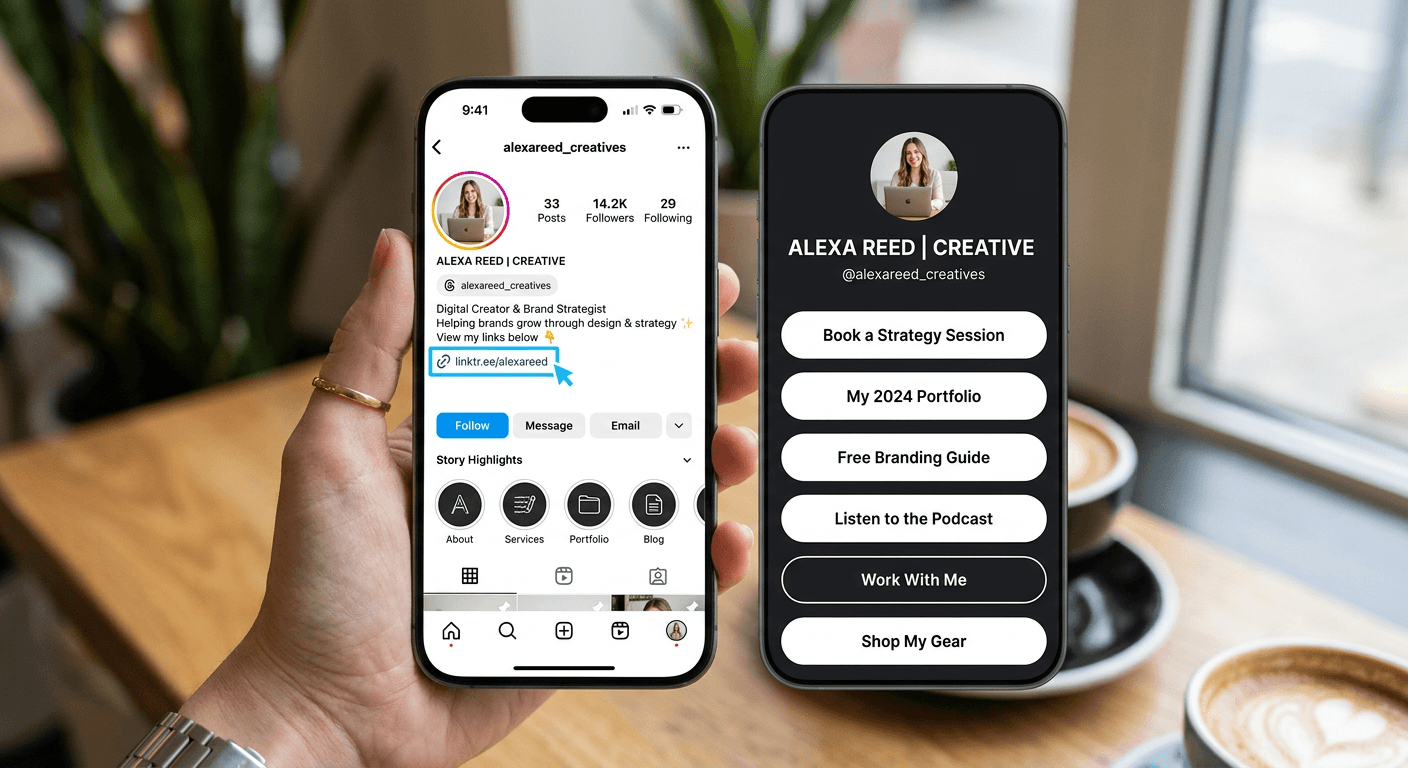
Optimizing your social media presence requires more than just high-quality visual content; it demands a functional pathway that leads your audience directly to your products, services, or professional portfolio. Understanding how to manage your digital touchpoints is critical for converting passive followers into active customers. When you effectively deploy a link on bio instagram, you create a seamless bridge between your content and your primary business objectives.
Quick Summary {#quick-summary}
Adding a link to your Instagram bio involves updating your profile settings to include a URL that directs users to a centralized hub of your web properties. This simple configuration is the primary method for driving social media traffic to external sites, shops, or booking platforms.
- Access profile settings in the app.
- Paste your destination URL into the "Website" field.
- Use a specialized aggregator to host multiple links.
- Monitor click-through rates to gauge audience interest.
Table of Contents {#table-of-contents}
- Understanding the Role of Profile Links
- How to Add a Link to Your Instagram Bio
- Optimizing Your Link Landing Page
- Common Pitfalls and Troubleshooting
- FAQ
- Recommended Reads
Understanding the Role of Profile Links {#understanding-the-role-of-profile-links}
For creators and business owners, Instagram serves as a top-of-funnel discovery engine. Because the platform restricts external linking in standard post captions, the bio area becomes the most valuable piece of digital real estate on your profile. By providing a clear, clickable destination, you eliminate the friction that often prevents followers from engaging with your external offerings.
A common mistake is relying on static, single-destination URLs that become outdated quickly. Instead, modern digital marketing relies on an all-in-one approach where a single link acts as a gateway to your entire ecosystem. Utilizing a professional link in bio platform allows you to consolidate multiple destinations - such as your latest blog post, product shop, or contact form - into a single, high-performing interface that matches your brand identity.
How to Add a Link to Your Instagram Bio {#how-to-add-a-link-to-your-instagram-bio}
To implement this update, follow these precise steps within your mobile application or desktop browser. The process is straightforward but requires attention to detail to ensure your link is functional and visually appealing.
- Navigate to your Instagram profile page by tapping your profile icon.
- Tap the "Edit Profile" button located directly below your bio text.
- Locate the field labeled "Links" or "Website."
- Paste the full URL (ensure it starts with http:// or https://) into the box provided.
- Tap "Done" or the checkmark icon in the top right corner to save your changes.
When you add link to instagram bio correctly, it immediately becomes active for anyone visiting your profile. Test the link personally by clicking it from your profile view to verify that it loads the intended landing page without redirect errors or SSL certificate warnings. If you are using a custom domain, ensure it is properly configured to avoid security blocks.
Optimizing Your Link Landing Page {#optimizing-your-link-landing-page}
Simply having a link is rarely sufficient for professional growth. Your landing page must be designed to convert visitors by offering a clear path to action. When users look for where is the link in bio on instagram, they expect a clean, organized, and mobile-responsive interface that categorizes your most relevant links.
Effective landing pages prioritize hierarchy. Place your most important call-to-action - such as a new product launch or sign-up sheet - at the top of the list. Use descriptive, action-oriented button text rather than generic "click here" labels. If your goal is to track traffic, ensure you have enabled analytics or tracking pixels within your custom landing pages tool to capture data on visitor behavior and referral sources.
Pro Tip: Update your link structure regularly. A stagnant link page can signal to your audience that your content is outdated. Treat your link-in-bio page like a dynamic storefront that reflects your current marketing campaigns.
Common Pitfalls and Troubleshooting {#common-pitfalls-and-troubleshooting}
One frequent issue is the "dead link," which occurs when a URL is misspelled or the destination site is down. Always verify that your link remains valid, especially if you have changed your website structure or domain name. Use URL shorteners or dedicated management platforms to maintain consistency even when your destination URLs change.
Another pitfall is clutter. Avoid overwhelming visitors with an infinite list of links. A high-performing profile page should be focused; if you have more than seven or eight links, group them into categories to maintain a clean aesthetic. Finally, ensure that your mobile view remains functional; if your landing page takes longer than three seconds to load on a standard 4G network, you are likely losing significant amounts of potential traffic due to bounce rates.
FAQ {#faq}
Can I add more than one link to my Instagram bio?
While Instagram's native settings allow for a primary URL, you can add multiple links by using a dedicated landing page tool. This allows you to host dozens of links on a single hub.
Where is the link in bio on Instagram located?
It is found directly beneath your profile description (your bio text). It appears as a blue, clickable URL that is visible to everyone who visits your profile.
Does changing my link affect my account engagement?
Changing your link does not impact your reach directly, but it can significantly impact conversion rates. Keeping your link relevant to your recent posts helps maintain interest.
Are there any restrictions on what links I can add?
Instagram has security filters that may block certain shortened URLs or malicious websites. If your link is blocked, verify that your domain is secure and follows standard web practices.