How to Link Your Instagram to TikTok: A Complete Guide
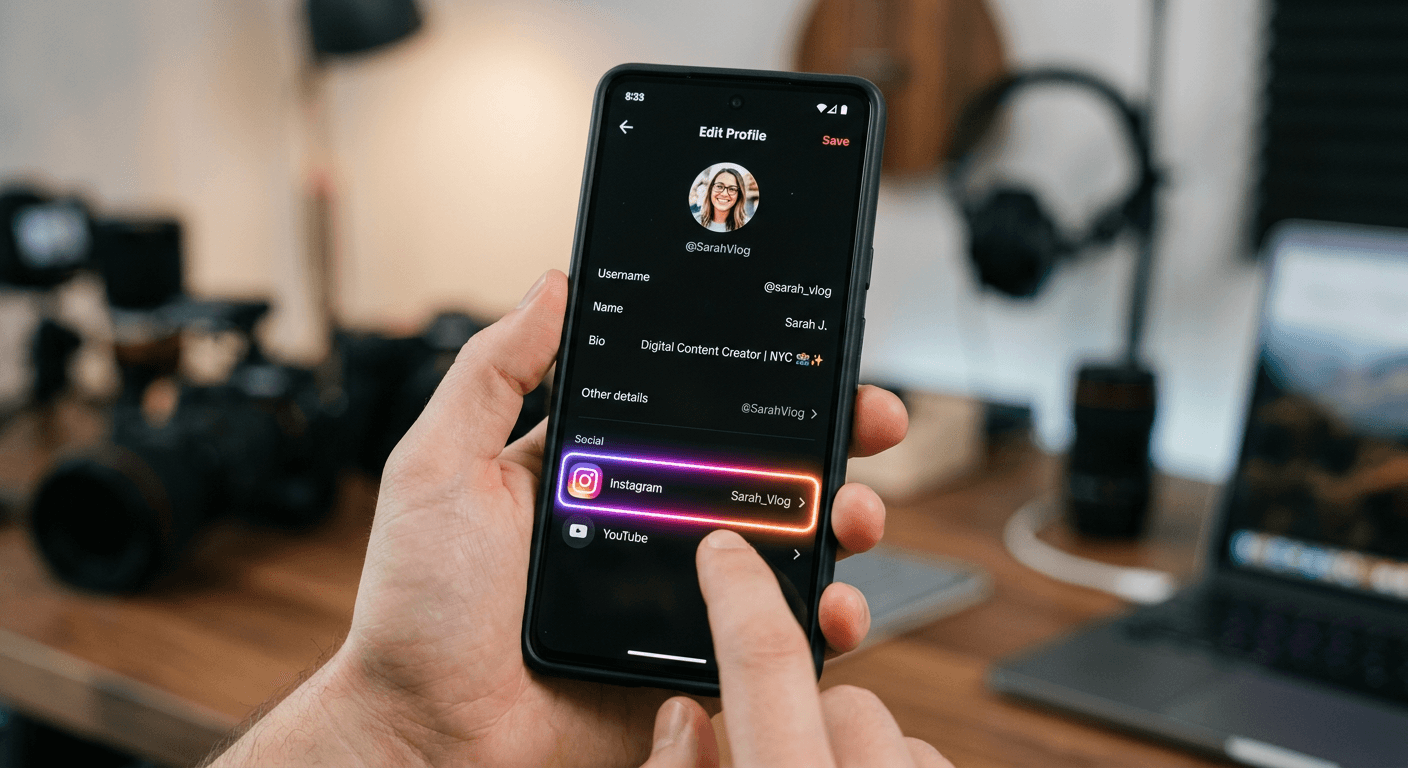
Connecting your social media profiles is basically the digital handshake of the modern creator economy. If you have been wondering how to link your Instagram to TikTok, you are not alone - most people find the cross-pollination of followers to be the secret sauce for growth. It is about creating a cohesive ecosystem where your content lives, breathes, and ultimately drives traffic back to your primary hub.
Quick Summary {#quick-summary}
Linking Instagram to TikTok involves using the native integration features within the TikTok profile settings. This allows users to display a direct button on their profile, facilitating seamless cross-platform navigation for followers.
- Navigate to your TikTok edit profile settings.
- Select the Instagram option under social links.
- Authorize the connection via Instagram login.
- Verify the link appears on your public profile.
Table of Contents {#table-of-contents}
- Quick Summary
- How to Link Your Instagram to TikTok
- Why Cross-Platform Integration Matters
- How to Put Instagram Link in TikTok Bio
- Troubleshooting Common Connection Issues

How to Link Your Instagram to TikTok {#how-to-link-your-instagram-to-tiktok}
Honestly, I believe that if you aren't pointing your TikTok audience toward your Instagram, you are leaving engagement on the table. It is like having a storefront with no sign on the door. People might walk by, but they won't know exactly where to go to see the rest of your catalog. You can find more helpful resources for managing social media profiles to streamline your digital footprint effectively.
To get started, open your TikTok app and head straight to your profile page. Look for the "Edit Profile" button - it is usually hard to miss. Once you are inside that menu, you will see a section labeled "Social." Tapping "Instagram" triggers a prompt to log in. It really is that straightforward. If you are struggling with the process, some users find that optimizing their digital link structure makes the whole experience much smoother for their followers.
Can You Link TikTok to Instagram?
People often ask if the connection works both ways. The answer is yes, but the implementation differs. While TikTok offers a direct integration button, Instagram is a bit more rigid. You generally have to rely on the "Edit Profile" link section on Instagram to house your TikTok URL. It acts as a two-way street for your traffic, provided you remember to update the links whenever your handles change.
Why Cross-Platform Integration Matters {#why-cross-platform-integration-matters}
Think of your social presence as a web. Every strand counts. If one strand is broken, the whole thing loses its structural integrity. By knowing how to add your Instagram to your TikTok bio, you essentially create a bridge. This bridge allows your most loyal fans to transition from short-form video consumption to your curated photo aesthetic on Instagram.
It is not just about vanity metrics, though. It is about building trust. When followers see you exist on multiple platforms, you appear more established. It adds a layer of legitimacy that a single-platform presence simply cannot match. Plus, if one platform decides to shadow-ban or limit your reach, you have already successfully migrated a portion of your audience elsewhere.
How to Put Instagram Link in TikTok Bio {#how-to-put-instagram-link-in-tiktok-bio}
For those who prefer a more manual approach or want to include multiple links, there is a specific method. Sometimes the native "Instagram" button doesn't suit your aesthetic goals. In these cases, you might want to learn how to add an Instagram link to the TikTok bio text area itself or use a link-in-bio tool.
- Copy your Instagram profile URL from your browser.
- Open your TikTok profile and tap "Edit Profile."
- Paste the URL into the "Bio" or "Website" field.
- Save your changes and test the link immediately.
This method gives you a bit more control over how things look. Just keep in mind that the native button is much easier for the average user to spot. If your primary goal is speed and ease of use, stick to the built-in integration.
Troubleshooting Common Connection Issues {#troubleshooting-common-connection-issues}
Sometimes, technology just decides to stop cooperating. Maybe the login screen keeps looping, or the button simply refuses to show up. First, check your internet connection. Sounds simple, right? You would be surprised how often a spotty Wi-Fi signal causes these hiccups. If that fails, try clearing your app cache or reinstalling TikTok entirely. Persistence is key here.
Updates and Permissions
Sometimes it is a permission issue. Ensure your Instagram account is not set to "private" if you are trying to sync it for business purposes, as that can occasionally cause a conflict. Always check for app updates in your app store as well. Developers push fixes for these minor bugs constantly, and you might just be one update away from a perfect connection.