How to Effectively Manage Your Instagram Bio Links
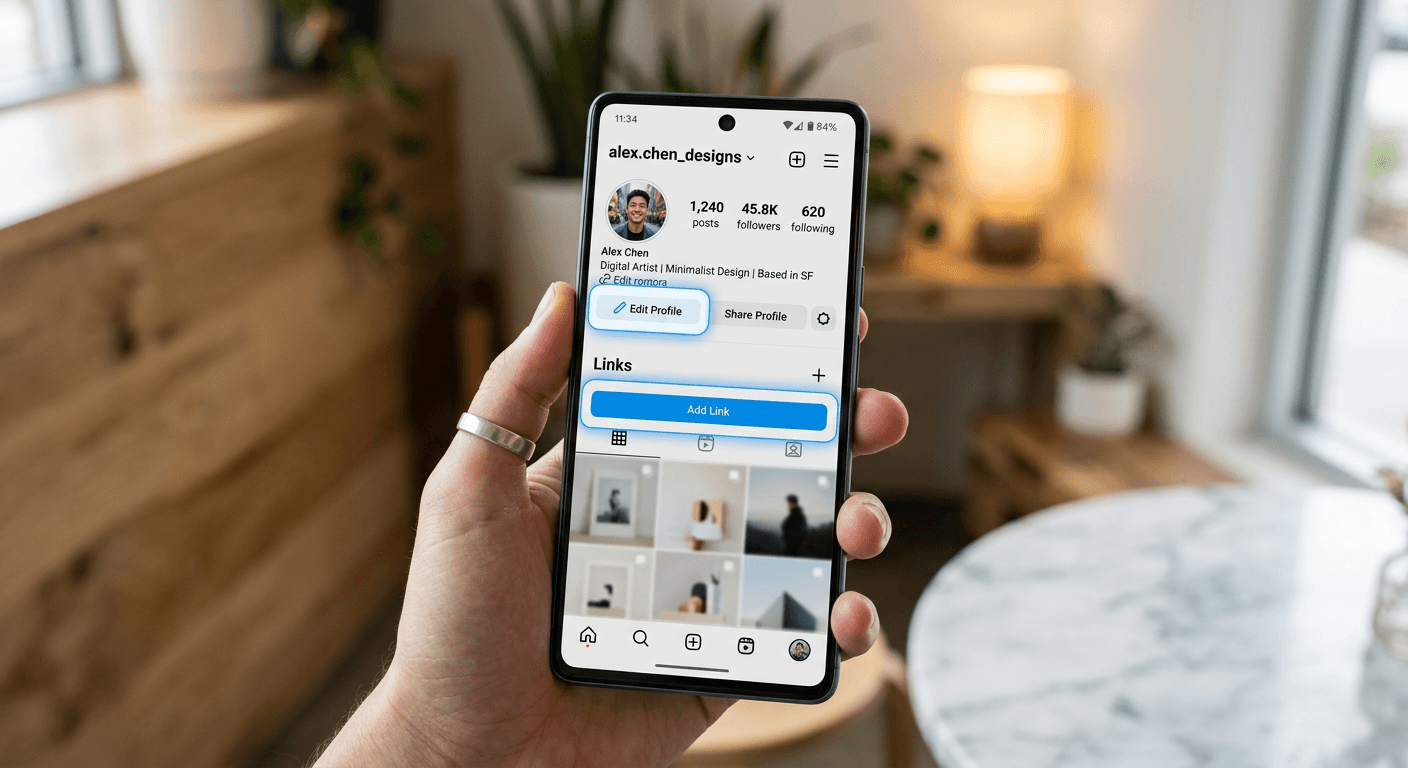
Optimizing your social presence begins with understanding how to add a link to your instagram bio effectively. Because Instagram limits external navigation to a single URL in your main profile, the ability to direct traffic to your most important assets—such as your shop, latest blog post, or booking page—is a vital skill for digital creators and brands. Mastering this process ensures that every profile visitor has a clear path toward conversion.
Quick Summary {#quick-summary}
Learning how to add a link to your instagram bio is the primary method for driving traffic from social media to external websites. Since Instagram restricts profile URLs to one field, users rely on link-in-bio tools or direct landing pages to consolidate multiple resources for their audience.
- Access the Edit Profile section to input or update your link.
- Use dedicated aggregation tools to house multiple destination URLs.
- Prioritize mobile-friendly landing pages for higher click-through rates.
- Leverage Instagram Stories to supplement your primary bio link.
Table of Contents {#table-of-contents}
- Quick Summary
- Understanding Link-in-Bio Mechanics
- Step-by-Step Guide: Adding Your Link
- Best Practices for External Traffic
- Common Pitfalls and Troubleshooting
- Frequently Asked Questions
- Recommended Reads

Understanding Link-in-Bio Mechanics {#understanding-link-in-bio-mechanics}
Instagram’s restrictive link policy is designed to keep users within the app, but it also creates a high-intent point of entry for those who do navigate away. When you are adding link to instagram bio fields, you are essentially creating a digital "front door" for your brand. This single URL should be treated as prime real estate, representing the most critical action you want your followers to take at any given moment.
Beyond basic website integration, professional users often utilize third-party redirection tools. These services provide a simplified landing page that hosts a collection of buttons, allowing you to showcase multiple offers without constantly swapping your primary profile link. Understanding these managed web solutions helps streamline your workflow and ensures that your traffic is directed to the most relevant content dynamically.
Step-by-Step Guide: Adding Your Link {#step-by-step-guide-adding-your-link}
To successfully modify your profile navigation, follow these technical steps within the Instagram mobile application. Ensure you are using the latest version of the app to avoid interface compatibility issues.
- Open the Instagram app and tap on your profile icon in the bottom right corner.
- Tap the "Edit Profile" button located directly below your profile summary and highlights.
- Locate the "Links" field. If you already have a link, you can tap it to modify or remove it; if it is empty, select "Add external link."
- Paste your desired URL into the web link field. Ensure you include the full "https://" prefix to guarantee the link is clickable.
- Add a descriptive title for your link if the platform prompts you, which helps users understand what they are clicking.
- Tap "Done" or the checkmark icon in the top right corner to save your changes.
Pro Tip: Always verify your link on a secondary device after updating. If your link is too long or messy, use a URL shortener to make the address cleaner, though ensure the final destination remains clear to the user.
Best Practices for External Traffic {#best-practices-for-external-traffic}
When you decide to add link to instagram bio configurations, consider the mobile experience above all else. Most users interact with your link via a smartphone, so the destination page must load rapidly and feature a layout optimized for touch-based navigation. If your landing page is sluggish or requires significant zooming, you will experience a high bounce rate despite successful clicks.
Additionally, keep your link strategy aligned with your current marketing campaigns. If you are launching a new product, your bio link should reflect that immediately. Integrating optimized digital assets helps bridge the gap between social engagement and tangible business results, ensuring your profile acts as an effective sales funnel rather than just a static contact card.
Common Pitfalls and Troubleshooting {#common-pitfalls-and-troubleshooting}
One of the most frequent errors users encounter is the "invalid link" notification. This usually happens when the URL is missing the necessary protocol or contains a typo. Always double-check that your URL is complete and leads to a live, secure website.
Another common issue is forgetting to update your link after a campaign ends. If you direct followers to a 404 error page or a long-expired sale, you lose credibility and potential conversions. Use a calendar or reminder system to audit your link regularly. If you find the manual process too cumbersome, consider consolidating your links into a single, permanent page that you update internally rather than changing the external URL itself.
Frequently Asked Questions {#frequently-asked-questions}
Can I add more than one link to my Instagram bio?
While Instagram has added a multi-link feature allowing up to five links, using a dedicated link-in-bio tool remains the best way to present a clean, branded list of unlimited destinations to your followers.
Why is my link not clickable?
Ensure you have added the "https://" prefix to your URL. If you paste only the domain, Instagram may not recognize it as a valid hyperlink, leaving it as plain text.
Does changing my bio link affect my SEO?
Changing your bio link does not directly impact SEO, but it does influence user behavior. Redirecting traffic to your main domain is generally better for your site’s domain authority than linking to third-party tools long-term.
How do I track clicks on my Instagram link?
If you use a custom landing page or a professional link-in-bio service, you can access analytics dashboards to see exactly how many people have tapped your link and which specific buttons they prefer.